- Update UG and DG
- Review others' DG during the tutorial
- Deliver v2.0 Thu, Apr 2nd 23:59
- Draft the PPP
Intro to tP Week 11

Things to note:
- Aim to reach the final version in this iteration itself: After this iteration is over, you get a chance to fix your tP bugs (in the project, as well as documentation) without any penalty. What's more, others will help you find those bugs (via tutorial activities and the PE Dry Run happening at the end of this iteration).
To take advantage of the above, try to make your v2.0 (product, DG, and UG) as close to what you intend to submit as your final version (i.e., v2.1). - You have two weeks to finish tP tasks listed under this week due to the extra week added on account of holidays.
We have kept the original v2.0 deadlines in the schedule, to signal that no extra work is need on account of the extra week given. You can use the extra week as a penalty-free grace period to finish up any leftover work from the iteration.
1 Update UG and DG
This task is time-sensitive. If done later than the deadline, it will not be counted as 'done' (i.e., no grace period).
- Update the User Guide to match the current version of the product. Reason: testers will need to refer to the UG during the practical exam dry run.
- Clearly indicate which features are not implemented yet e.g. tag those features with a
Coming soon. - For those features already implemented, ensure their descriptions match the exact behavior of the product e.g. replace mockups with actual screenshots
- Clearly indicate which features are not implemented yet e.g. tag those features with a
- Save the UG as a PDF file using this technique exactly. You'll need this file later when you create a product release. There is no specific file name convention for this version of the UG, but do use a reasonable file name: e.g.,
Contacts-Pro-User-Guide.pdf.
- Similarly, update the Developer Guide (DG), and save it as PDF file.
2 Review others' DG during the tutorial
- To be done during the tutorial. Please don't do this task before the tutorial as others need time to update their DGs.
- Read all instructions before you start the activity.
- Find the team choices you have been allocated to review, as given in the panel below.
Decide which of the given team(s) to review:
- Open the DG link of the team allocated as 'First choice'.
- Confirm that the DG has significant updates, to the diagrams in particular. If it doesn't, you can try the DG of the 'Second choice' team, and failing that, 'Third choice' team.
- If none of the three has enough updates but collectively they have enough updates, you can also review all of them.
- Failing all above, you can pick any other team(s) to review.
- Try to give at least 4 comments in total.
- If the PR already has reviews, you can give your own input of the existing review comments too.
Go to the PR of the team(s) you have chosen to review.
Review the
Designand theImplementationsections w.r.t possible DG bugs (given further down); add your observations as comments.
- In the PR, add review comments (i.e., in the files changed tab) in the corresponding place of the code.
- In this case, choose the option rather than option.
- But if the 'files changed' tab is too laggy, you can add a normal comment instead in the conversation tab.
- In this case, enter each observation as a separate comment (reason: our bot will count the number of comments you have given to determine if you qualify for participation points)
- As you know, it is better to phrase your comments as question/doubts (e.g.,
Is this format correct? Should it be ... instead?) rather than directives (e.g.,Change this to ...).
Where possible, use screenshots from their DG in your comments, preferably with annotations. This is particularly useful when commenting on diagrams. An example given below:
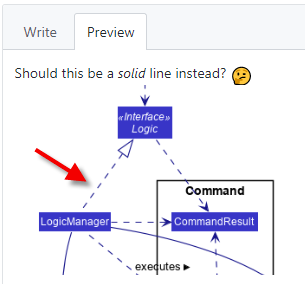
- The understanding you gain from this exercise can indirectly determine how well you do in your own project. Note that your comments will be reviewed by a tutor later.
- After the tutorial, if you are unsure about a concern raised by a reviewer, you can post in the forum to seek the opinion of the teaching team.
3 Deliver v2.0 Thu, Apr 2nd 23:59
- Finish implementing the features you intend to have in the final version.
Ways to level up your tP game:
- Consider increasing test coverage by adding more tests if it is lower than the level you would like it to be. Take note of our expectation on test code (given in the panel below).
- After you have sufficient code coverage, fix remaining code quality problems and bring up the quality to your target level. Note that the quality of the code attributed to you accounts for a significant component of your final score, graded individually (based on the code attributed to you by the tP code dashboard).
Do a . Do the release by the given deadline.
Do a smoke-test to ensure the jar file works (if the released jar file is broken, it will be omitted from the PE-D).- Include the following files in the release (as separate assets):
- JAR file
- UG (PDF file) -- uploaded as an 'asset' (similar to the JAR file), not embedded in the release note.
- DG (PDF file) -- similar to the UG
- You may choose any suitable filename, but recommended not to have spaces or special characters in the JAR file name.
- It is optional to write detailed release notes for this version.
- Include the following files in the release (as separate assets):
You can do an additional release before the PE dry run (PE-D) if you wish, as long as you do it before 10am of the PE-D day. When doing this additional release, do not delete the previous release (reason: it is good to preserve the release history) -- testers are expected to test the latest release file anyway. You may use any suitable version number for this JAR file e.g.,
v2.0.1.
Waiting till Friday 10am to release thev2.0is strongly discouraged because if you miss that deadline, your team will not be able to benefit from the PE-D at all. It is better to have an earlier release to fall back on in case that happens.IMPORTANT: ensure your jar file was generated using Java 17 and can work on all major OS'es using JDK 17.
- As before, wrap up the milestone (i.e., reschedule/close any remaining issues/PRs and close the milestone).
4 Draft the PPP
This task is time-sensitive. If done later than the deadline, it will not be counted as 'done' (i.e., no grace period).
- Create the first version of your Project Portfolio Page (PPP).Each member needs to create a PPP to describe your contribution to the project.
Convert the PPP to a PDF to see if the page-count is within expectations (the PDF version can be longer than what you would expect by looking at the HTML version).